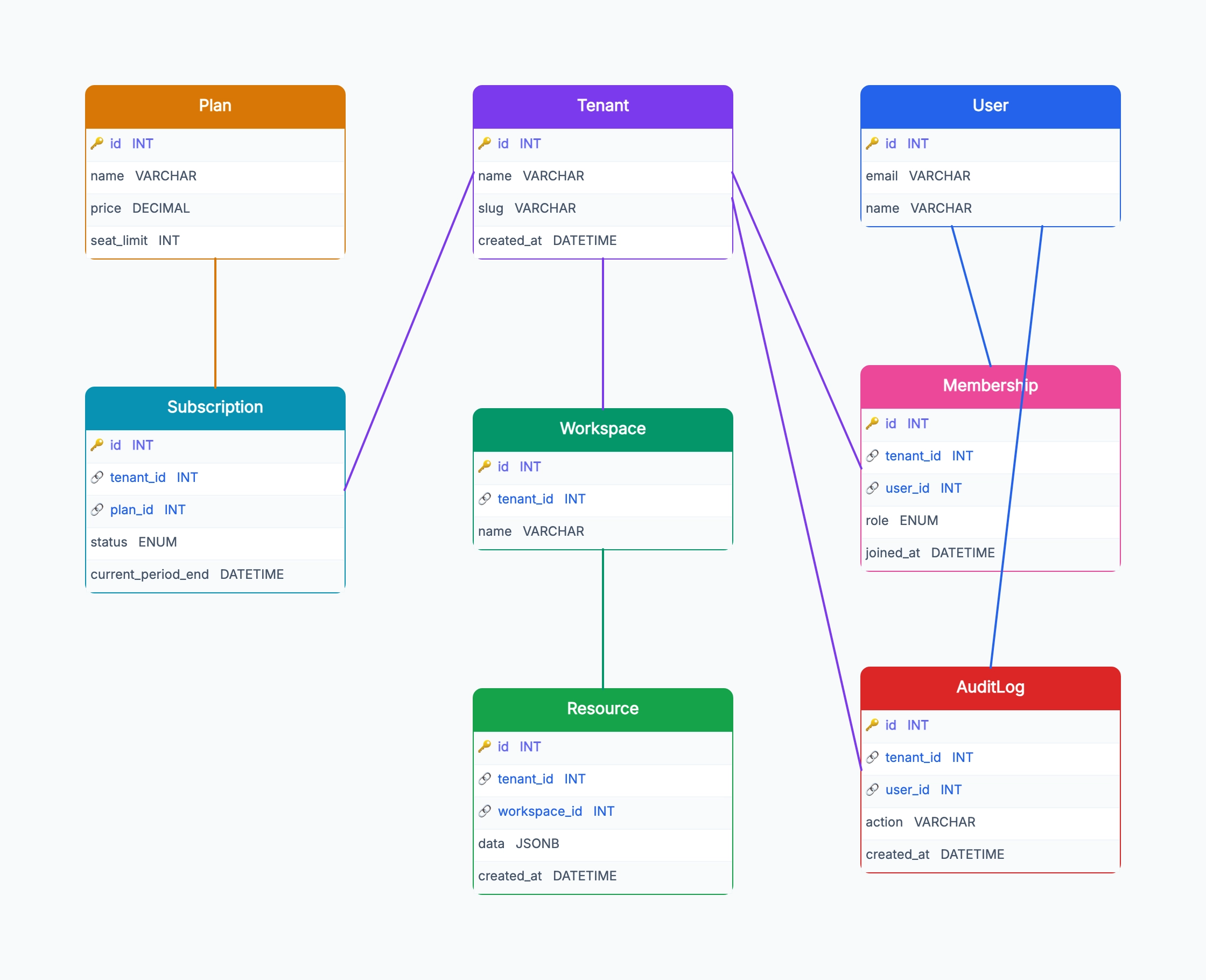
Shared schema with tenant_id (the default)
Who uses it: Developer building a first B2B SaaS
One Postgres database, one schema
Every business table has a non-null tenant_id column
Row-level security policies enforce isolation
Subscriptions, plans, and audit logs scoped by tenant_id
Backups and migrations apply to all tenants at once
Why this works: Shared schema is the simplest and cheapest multi-tenant pattern — one database, one set of tables, isolation via tenant_id everywhere. The diagram's job is to make sure no business table is missing tenant_id, which is the most common cause of cross-tenant data leaks.
Schema per tenant
Who uses it: Team with regulatory or large-customer isolation needs
One database, one schema per tenant
Tenant table lives in a public/control schema
No tenant_id columns inside tenant schemas
Migrations applied to each schema separately
Stronger isolation at the cost of operational complexity
Why this works: Schema-per-tenant trades ops simplicity for stronger isolation — the diagram removes tenant_id from business tables because the schema itself defines the boundary, which suits regulated industries or very large enterprise customers.
Hybrid (shared default, isolated for enterprise)
Who uses it: SaaS with a mix of small and enterprise customers
Most tenants live in the shared schema with tenant_id
Enterprise tier gets its own schema or even database
A 'placement' column on Tenant points at the right backend
Routing layer reads placement to pick the connection
Migrations run twice: shared once, per-enterprise per schema
Why this works: Hybrid lets you start cheap and upgrade specific customers — the diagram adds a placement column on Tenant that routes queries to either the shared schema or an isolated one, giving you a path to data-sovereignty deals without rewriting from day one.
B2C with personal workspaces
Who uses it: Consumer SaaS where each user gets their own workspace
Tenant becomes 'Workspace' or 'Account', often one per user
Membership still exists for shared/team workspaces
Free vs paid plans drive subscription state
All resources scoped by workspace_id
Personal workspaces auto-created on signup
Why this works: B2C SaaS often reuses the multi-tenant shape but renames Tenant to Workspace and auto-creates one per signup — the diagram still treats workspace as the scoping boundary, which keeps the door open for team plans later without restructuring.