Back to template

Dependency Map Examples

These dependency map examples show how teams make software relationships visible before changing systems. They are especially useful when architecture has grown organically and the risky dependencies are no longer obvious.

Dependency Map Examples

Real examples

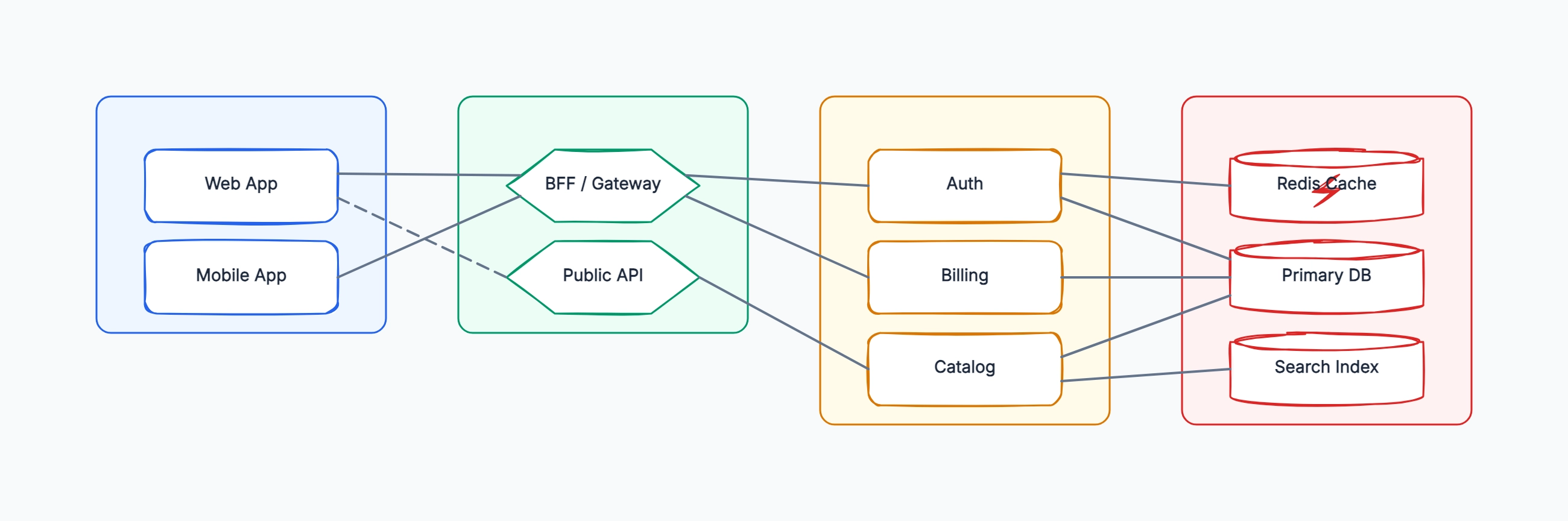
SaaS application dependency map

Who uses it: Engineering team planning a backend refactor

Presentation: Web App, Mobile App
API: BFF/Gateway, Public API
Domain: Auth, Billing, Catalog
Data: Primary DB, Redis Cache, Search Index
Critical path: Web App → BFF → Billing → Primary DB
Optional path: Web App → Public API → Catalog

Why this works: Layering the diagram makes it easy to see when a frontend bypasses the intended gateway or when multiple services depend on the same data store.

Monolith extraction map

Who uses it: Tech lead deciding which module to extract first

Monolith modules: Auth, Orders, Catalog, Notifications
Shared database tables: users, orders, products
External dependencies: Stripe, SendGrid, Search
Candidate extraction: Notifications has fewest inbound dependencies
High-risk extraction: Orders touches payments and inventory

Why this works: A dependency map should reveal sequencing. The best first extraction is often the module with a clear boundary and low write coupling, not the module that feels most important.

Incident response dependency map

Who uses it: SRE or engineering manager investigating an outage

Symptom: checkout API latency spike
Upstream callers: Web checkout, Mobile checkout, Admin order tool
Downstream dependencies: Payment API, Inventory Service, Primary DB
Shared dependency: Redis cache miss rate increased
Blast radius: all order creation paths affected

Why this works: During an incident, the map helps separate symptoms from dependencies. Teams can quickly see which callers are affected and which downstream system is most likely causing the failure.

Cloud migration dependency map

Who uses it: Platform team moving services between environments

Current environment: legacy VM services and shared PostgreSQL
Target environment: Kubernetes services and managed databases
Network dependencies: firewall rules, service discovery, private endpoints
Temporary bridge: old API gateway routes traffic to both environments
Cutover order: stateless services before stateful stores

Why this works: Migration maps need to show both current and target dependencies. Without the temporary bridge and cutover order, the architecture diagram hides the hardest part of the project.

Tips for better study mind maps

  • Draw dependencies from consumer to provider so the direction answers who relies on whom.
  • Do not hide shared databases; they are often the highest-risk dependency in the system.
  • Use layers to keep the map readable as the number of nodes grows.
  • Review the map during incidents and migrations, not only during architecture planning.

Start editing online

Go back to the template, swap in your own topics, and keep the same structure if it fits your class or project.

Use this template: /editor/new?template=dependency-map

Use this dependency map template