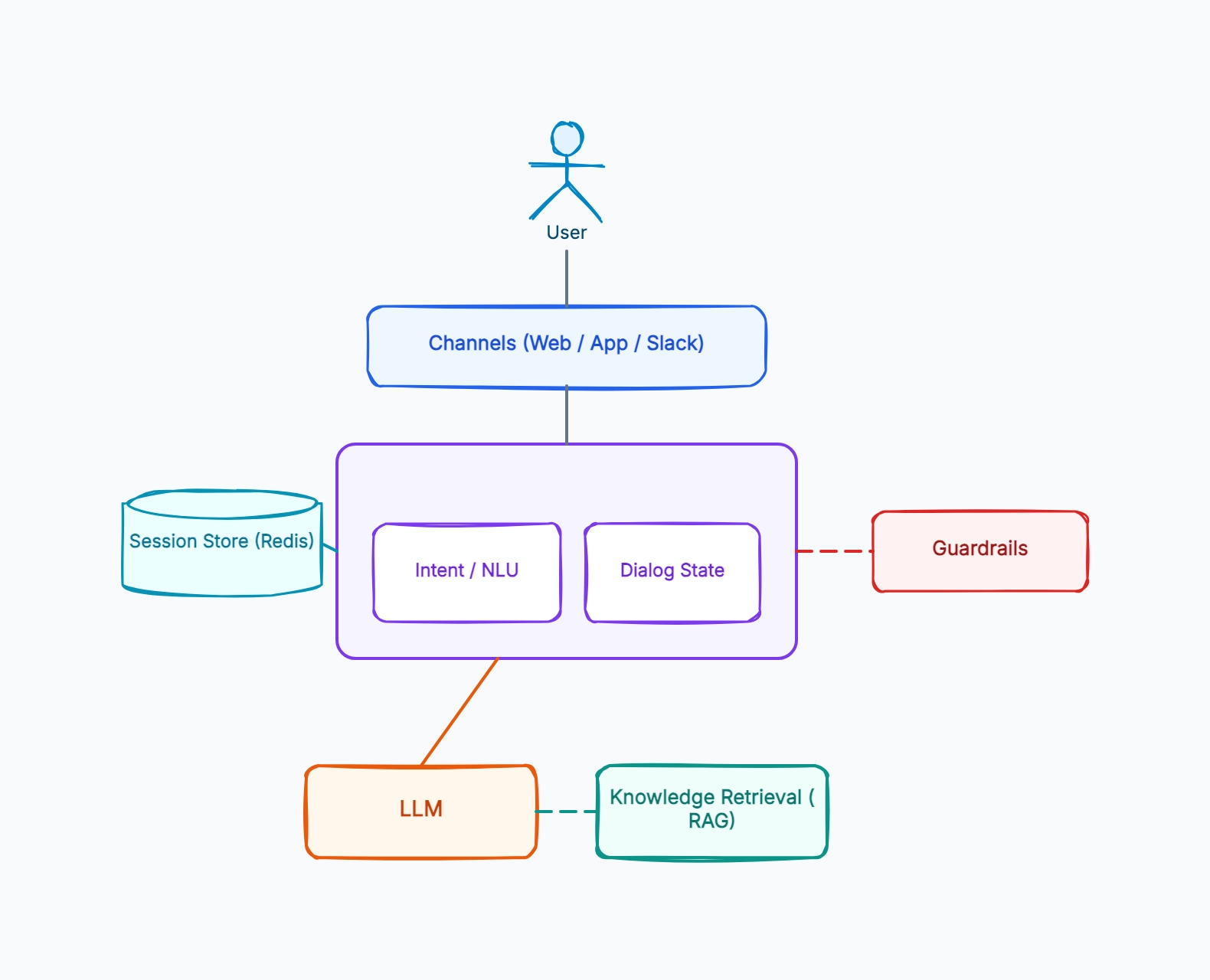
RAG-grounded support bot
Who uses it: Team building a chatbot over help-center docs
Channels: website widget + in-app chat
Dialog manager routes every message to the LLM
RAG retrieves relevant help articles before generation
Guardrails: PII redaction on input, citation check on output
Session store keeps the conversation thread
Why this works: A RAG support bot is the most common production pattern — grounding every answer in retrieved docs is what keeps the bot from confidently making up policies, and the diagram should show retrieval happening before generation.
Intent-based chatbot (classic NLU)
Who uses it: Team with well-defined flows (booking, FAQ, status checks)
NLU classifies the message into a fixed set of intents
Dialog manager runs a scripted flow per intent
Slots filled by follow-up questions before an action
LLM used only for fallback / free-text understanding
Backend APIs called for transactional actions
Why this works: Intent-based design fits bounded tasks where you need deterministic flows — the diagram centers on the NLU classifier and scripted dialog, with the LLM as a fallback rather than the core, trading flexibility for control.
Multi-channel assistant
Who uses it: Team serving one bot across web, mobile, and Slack
One dialog manager behind many channel adapters
Each adapter normalizes channel-specific formatting
Shared session store keyed by user across channels
Same LLM + RAG core regardless of channel
Channel-aware rendering of the final reply
Why this works: A multi-channel assistant separates channel adapters from the core — the diagram shows many front ends collapsing into one dialog manager, so business logic lives once and each channel only handles its own formatting.
Voice chatbot
Who uses it: Team adding a spoken interface
Speech-to-text converts audio to a message
Same dialog manager + LLM + RAG core as text
Text-to-speech converts the reply back to audio
Lower latency budget — streaming responses matter
Session store unchanged from the text bot
Why this works: A voice bot wraps the text architecture in STT and TTS layers — the diagram makes clear that the conversational core is identical, and only the input/output transduction and latency budget change.