Back to template

Agentic Workflow Architecture Diagram Examples

These agentic workflow examples show how orchestration changes shape — from a fixed linear pipeline, to a plan-execute-reflect loop, to event-driven and human-gated workflows.

Agentic Workflow Architecture Diagram Examples

Real examples

Linear pipeline (no loop)

Who uses it: Developer automating a fixed sequence of AI steps

Trigger → step 1 → step 2 → step 3 → output
Each step is a fixed LLM or tool call
No planner — the sequence is hardcoded
State passed forward between steps
Deterministic: same input, same step order

Why this works: A linear pipeline is the simplest 'agentic' workflow — it's really just a chain. The diagram has no loop or planner because the steps never change, which is the right choice when the task structure is known up front.

Plan-execute-reflect loop

Who uses it: Team building a workflow that adapts as it runs

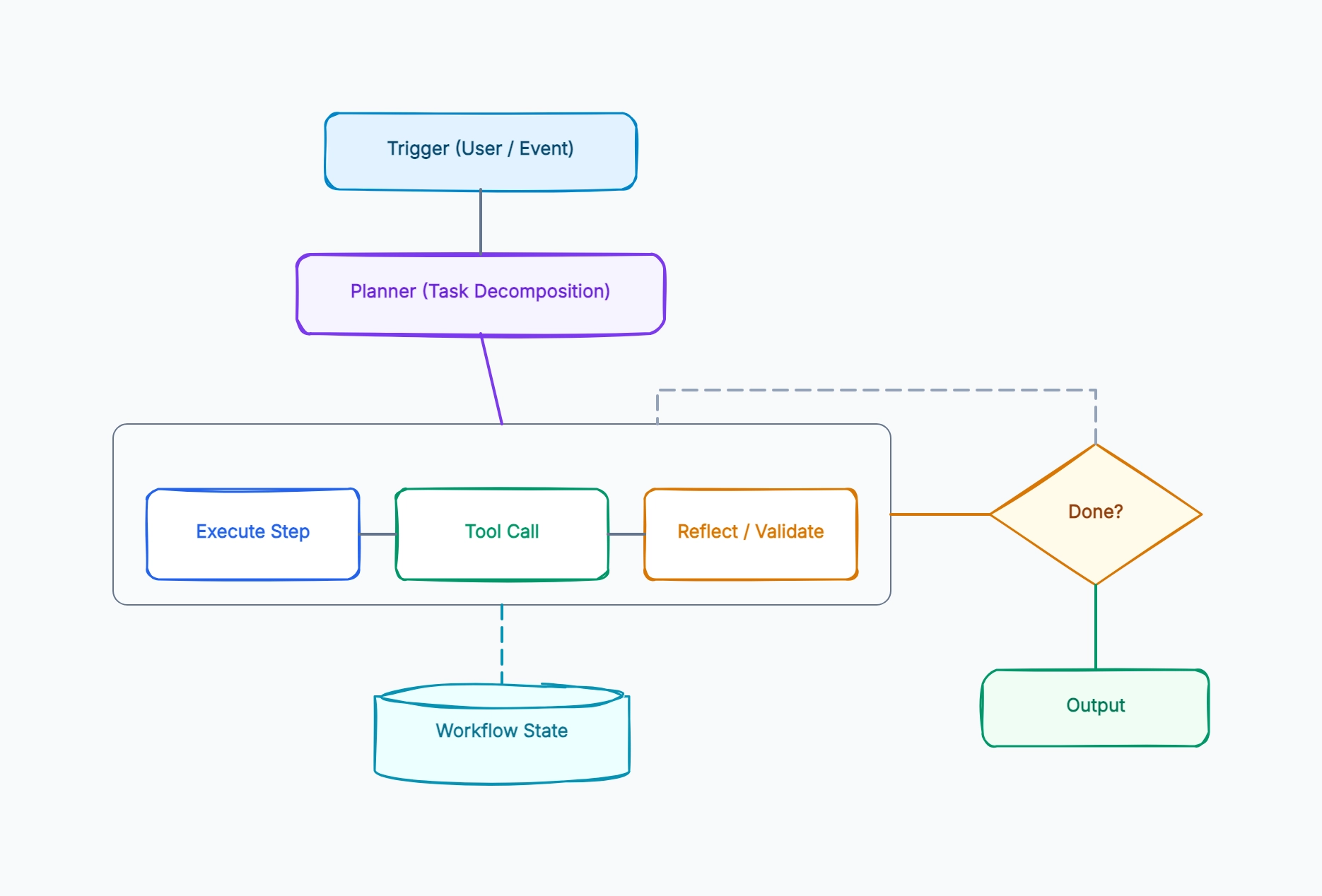
Planner decomposes the goal into dynamic steps
Loop: execute → tools → reflect on the result
Reflect step can revise the remaining plan
State store holds the plan and completed-step results
Termination check ends when the goal is satisfied

Why this works: Plan-execute-reflect is the canonical agentic workflow — the reflect step is what makes it adaptive, letting the workflow revise its plan mid-run rather than blindly executing a fixed sequence.

Event-driven workflow

Who uses it: Team triggering workflows from system events

Trigger is an event (webhook, queue message, schedule)
Workflow runs asynchronously, not tied to a user session
State persisted to a durable store for resumability
Steps can wait on external callbacks before continuing
Output is an action (email sent, ticket created), not a chat reply

Why this works: Event-driven workflows decouple the trigger from a user — the diagram emphasizes durable state because the workflow may pause for minutes or hours waiting on an external event before resuming.

Human-gated workflow

Who uses it: Team where steps need approval before proceeding

Loop runs until it hits an approval gate
Workflow pauses and persists state at the gate
A human approves, rejects, or edits the plan
Approved → resume loop; rejected → re-plan
Every gate decision logged for audit

Why this works: Human-gated workflows insert an approval step into the loop — the diagram makes the pause-and-resume explicit, because the workflow must durably persist state while waiting, sometimes indefinitely, for a human.

Tips for better study mind maps

  • Draw the loop-back path explicitly — the iteration is what distinguishes an agentic workflow from a linear chain.
  • Show the termination check as a distinct decision node; a workflow without a visible stop condition is a bug waiting to happen.
  • Keep workflow state as a separate persisted node, not state hidden inside the loop — durability is what makes workflows resumable.
  • Separate the planner from the executor; planning and doing are different responsibilities even in one workflow.

Start editing online

Go back to the template, swap in your own topics, and keep the same structure if it fits your class or project.

Use this template: /editor/new?template=agentic-workflow-architecture

Edit this agentic workflow template