Mermaid and Lucidchart sit at opposite ends of the diagramming spectrum: one is free, text-based, and built for developers; the other is a paid, polished visual platform built for teams. If you're weighing Mermaid vs Lucidchart, the real decision is about how your team works, not just features.
This guide compares the two on the dimensions that actually matter — and shows where an AI-native middle ground fits.
TL;DR
- Pick Mermaid if you're a developer and your diagrams belong in docs, READMEs, or specs. It's free, version-controlled as text, and renders automatically in GitHub and Notion.
- Pick Lucidchart if you need real-time collaboration, a polished visual canvas, data-linked diagrams, and enterprise features like SSO — and you're willing to pay per seat.
- Cost is a real divider: Mermaid is free and open source; Lucidchart's free tier is capped at 3 editable documents, with its Individual plan currently listed at $9/month plus tax.
- Want AI generation plus visual editing without the price tag? That middle ground is where tools like CodePic sit.
Mermaid vs Lucidchart at a Glance
| Dimension | Mermaid | Lucidchart |
|---|---|---|
| Approach | Diagram-as-code (text) | Visual drag-and-drop |
| Pricing | Free, open source | Free tier (3 editable docs); Individual $9/mo + tax |
| Best for | Developer docs, version-controlled diagrams | Cross-functional teams, polished deliverables |
| Real-time collaboration | No (via Git workflow) | Yes, native multi-cursor |
| Visual precision | Auto-layout only | Full manual control |
| Data-linked diagrams | No | Yes (CSV / Excel import) |
| Version control | Excellent (plain text) | Built-in history (proprietary) |
| Renders in | GitHub, GitLab, Notion, docs tools | Lucidchart app, embeds |
| Account required | No | Yes |
| Enterprise (SSO, SOC 2) | Self-managed | Yes |
| AI generation | LLMs output Mermaid text | Limited AI assist |
The Core Trade-off: Free Text vs Paid Visual
Mermaid is diagram-as-code. You write a few lines of markdown-like syntax and it renders. Because it's plain text, it's free, lives in your repo, and diffs cleanly in code review. For developers documenting systems, that's a perfect fit — and there's no bill.
Lucidchart is a managed visual platform. You get a polished drag-and-drop canvas, real-time co-editing, comments, data-linked diagrams, and enterprise controls. None of that is free at scale — the free tier caps you at 3 editable documents and 60 shapes per document, while the Individual plan is currently listed at $9/month plus tax.
So the headline trade-off is blunt: Mermaid costs nothing but asks you to write code and gives up visual control and live collaboration. Lucidchart gives you all of that polish and teamwork — for a per-seat price.
Where Each One Wins
Mermaid wins when:
- Diagrams live in documentation, READMEs, or technical specs
- You want them version-controlled and reviewed like code
- Your audience is developers
- Budget is zero
Lucidchart wins when:
- Non-technical teammates need to read and edit diagrams
- You need real-time collaboration and comments
- You're generating diagrams from spreadsheet data
- You need enterprise features (SSO, audit, SOC 2)
If your diagrams are a byproduct of engineering work, Mermaid. If they're a shared deliverable across a company, Lucidchart.
Compare by Diagram Type
The right tool depends on what you're diagramming. A quick breakdown:
Flowcharts. Mermaid's flowchart syntax is compact and diffs beautifully in PRs, but auto-layout is fixed — you can't nudge a node to avoid an awkward crossing. Lucidchart gives you full manual control and a large shape library. For simple flowcharts inside docs, Mermaid; for polished flowcharts shared with non-engineers, Lucidchart.
Sequence diagrams. Mermaid was built with sequence diagrams in mind, and it's arguably the best free option for developers documenting service interactions in code. Lucidchart supports them but the manual editing overhead is real. Mermaid wins here unless your audience is non-technical.
ER diagrams / database schemas. Mermaid can render simple ER diagrams from text, but for anything beyond a handful of tables the layout suffers. Lucidchart handles complex schemas with data linking and imports — the right pick when the ER diagram is a real deliverable, not a doc snippet.
System architecture / cloud diagrams. Lucidchart's AWS / Azure shape libraries and data import are hard to beat if you're building a real architecture diagram for review. Mermaid works for high-level "boxes and arrows" but stops short of a polished cloud diagram.
Gantt charts and roadmaps. Mermaid supports Gantt syntax and renders inside docs, which is convenient for a lightweight project timeline. Lucidchart isn't optimized for Gantt — for anything project-management-serious, use a dedicated tool.
So the rule of thumb: Mermaid excels at diagrams that live inside developer artifacts (docs, PRs, wikis). Lucidchart excels at diagrams meant to be shared as standalone deliverables across a company.
Test Both with a System Design
Use one realistic architecture—not a three-box demo—to evaluate the workflow. Start from this system design template, then recreate the same services and connections in Mermaid. Ask both an engineer and a non-technical reviewer to make one change.
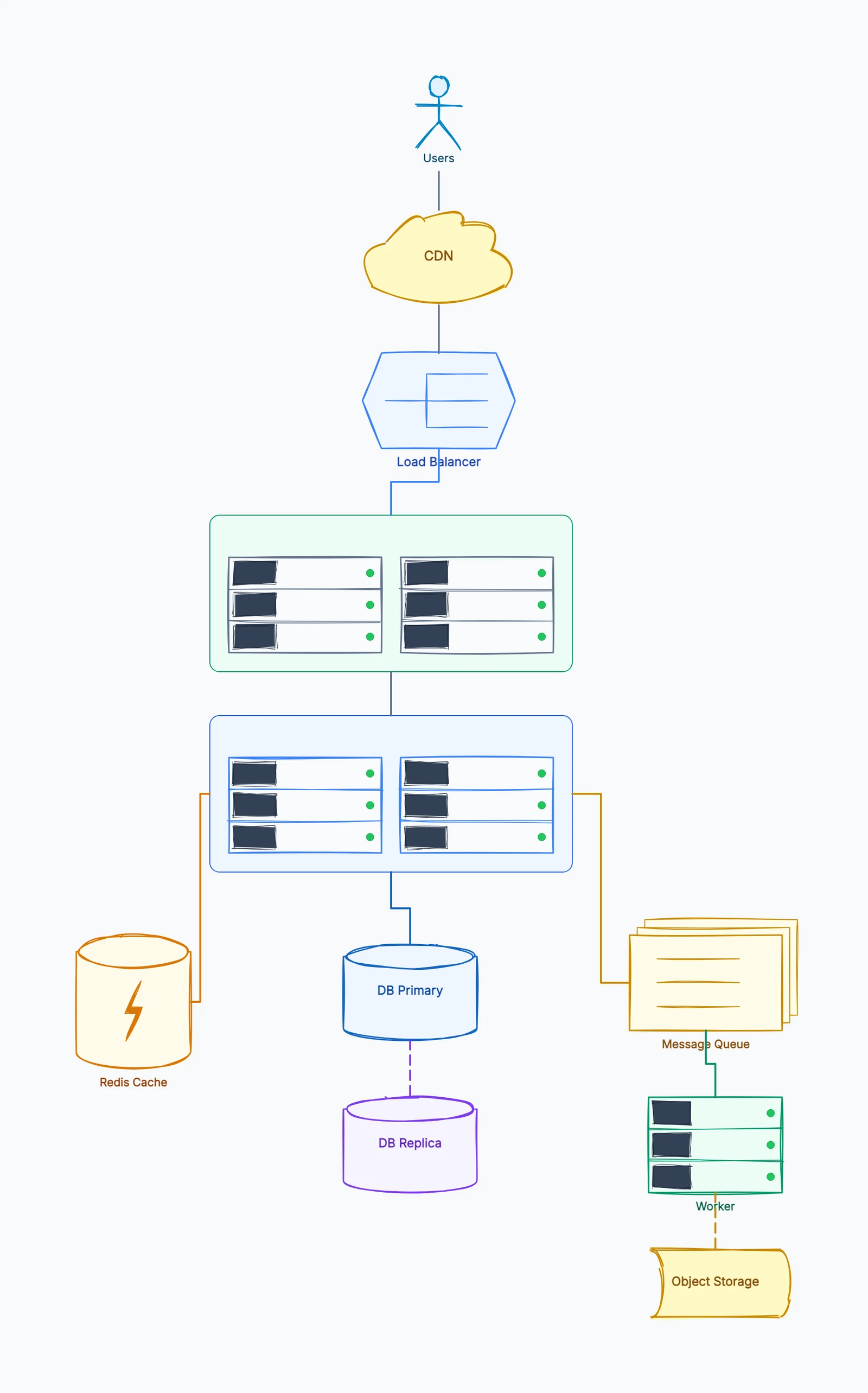
System design
Try this templateThe faster option is not necessarily the one that draws first; it is the one your actual owners can update correctly after the next architecture change.
Collaboration and Version Control in Practice
The comparison becomes clearer when a diagram changes after review.
With Mermaid, the author edits text in the same branch as the documentation. A reviewer sees exactly which node, label, or connection changed in the pull request. The rendered image updates when the documentation builds. This workflow is strong when engineers own the diagram, but a product manager who does not know Mermaid syntax may only be able to comment rather than make the change.
With Lucidchart, reviewers open the document, comment on a shape, or edit the canvas together. Visual changes are easy for mixed teams, and document history records versions inside Lucid. The trade-off is that the diagram is a separate managed artifact: a code change does not automatically update it unless the team deliberately includes diagram review in its process.
Use a simple ownership rule. If the diagram is part of the software source of truth, keep it as Mermaid near the code. If the diagram is a workshop output or a cross-functional decision record, Lucidchart's visual collaboration is usually easier. For a free visual editor comparison without the per-seat model, see Mermaid vs draw.io.
Migration: Mermaid to Lucidchart and Back
Lucidchart's current Mermaid workflow lowers the switching cost: paste supported Mermaid syntax and create native editable Lucid shapes. That is useful when an engineering draft needs to become a polished artifact for a broader audience.
Treat the conversion as a handoff, not synchronization. Once people move shapes and restyle connectors in Lucidchart, those edits do not automatically rewrite the Mermaid source. Decide which version becomes authoritative, store a link beside the older version, and avoid maintaining both unless a real workflow requires it.
The reverse direction is less automatic. Turning a visually arranged Lucidchart document into concise Mermaid usually requires rebuilding the structure in text and accepting Mermaid's auto-layout. For diagrams that must move repeatedly between code and visual editing, choose one source of truth and regenerate the other output rather than editing both independently.
What's New in 2026
A few changes worth knowing before you pick:
- Mermaid's ecosystem has matured. GitHub, GitLab, and Notion all render Mermaid natively, and most modern doc tools (Obsidian, Docusaurus, MkDocs) support it out of the box. This makes "just embed Mermaid" viable in more places than it was two years ago.
- AI generation shifted the game. ChatGPT, Claude, and Cursor can all output valid Mermaid syntax from a plain-language prompt — for a first draft of a flowchart or sequence diagram, it's often faster than opening any visual tool.
- Lucidchart is per-seat priced. The free tier caps at 3 editable documents and 60 shapes per document; the Individual plan is currently listed at $9/month plus tax, with separate team and enterprise options.
- Lucidchart's Mermaid workflow is more useful now. Supported Mermaid syntax can be pasted into a document as native editable shapes. It is still a handoff rather than live two-way synchronization with a source file.
The Middle Ground: Generate with AI, Edit Visually
Both tools force a compromise. Mermaid is free and fast to generate (any LLM can emit Mermaid), but static and visually rigid. Lucidchart is visually rich and collaborative, but you pay for it and still build diagrams largely by hand.
A newer approach removes the compromise. CodePic connects to AI coding agents through the MCP protocol: Cursor or Claude generate a diagram from a plain-language prompt — as fast as emitting Mermaid — and the result lands on an editable visual canvas you can refine and export, without a per-seat bill. It's free to use.
The point isn't that it replaces either tool — it's that "free text vs paid visual" is no longer the only choice on the board.
Frequently Asked Questions
What is the difference between Mermaid and Lucidchart?
Mermaid is free diagram-as-code — text that renders a diagram and version-controls like code. Lucidchart is a paid visual platform with drag-and-drop editing, real-time collaboration, and enterprise integrations. Mermaid suits developers; Lucidchart suits cross-functional teams.
Is Mermaid a free alternative to Lucidchart?
For developer-centric diagrams in docs or code, yes. But Mermaid doesn't replace Lucidchart's visual editing, real-time collaboration, or data-linked diagrams — so it's a partial alternative, not a drop-in one.
Does Lucidchart support Mermaid diagrams?
Yes. Paste supported Mermaid syntax into Lucidchart to create native editable shapes. The converted diagram can be moved and styled visually, but it does not remain synchronized with the original Mermaid source.
Which is better for software documentation?
Mermaid, in most cases — plain-text diagrams sit inside READMEs and specs, diff cleanly in pull requests, and never drift into a stale separate file. Lucidchart is better for standalone deliverables aimed at a mixed audience.
Can Mermaid work offline?
Yes. Mermaid can be rendered locally or inside a private documentation build. That makes it useful when diagrams must remain in a repository or controlled environment rather than a hosted visual workspace.
Summary
Mermaid is the free, developer-first, text-based choice. Lucidchart is the paid, team-first, visual choice. Pick based on who edits the diagrams and where they live.
And if you'd rather generate diagrams with AI and still edit them visually — without paying per seat — that's the gap AI-native diagramming fills.
For more comparisons, see:
- Mermaid vs draw.io (2026): Diagram-as-Code or Visual Editor? — The closest free-tool comparison for developer diagrams.
- draw.io vs Lucidchart — The traditional visual diagramming comparison.
- Miro vs draw.io (2026): Team Whiteboard or Free Diagram Tool? — If collaboration platforms are also on the table.
- tldraw vs Excalidraw (2026): Which Hand-Drawn Whiteboard Is Better? — The free whiteboard side of the diagramming landscape.


