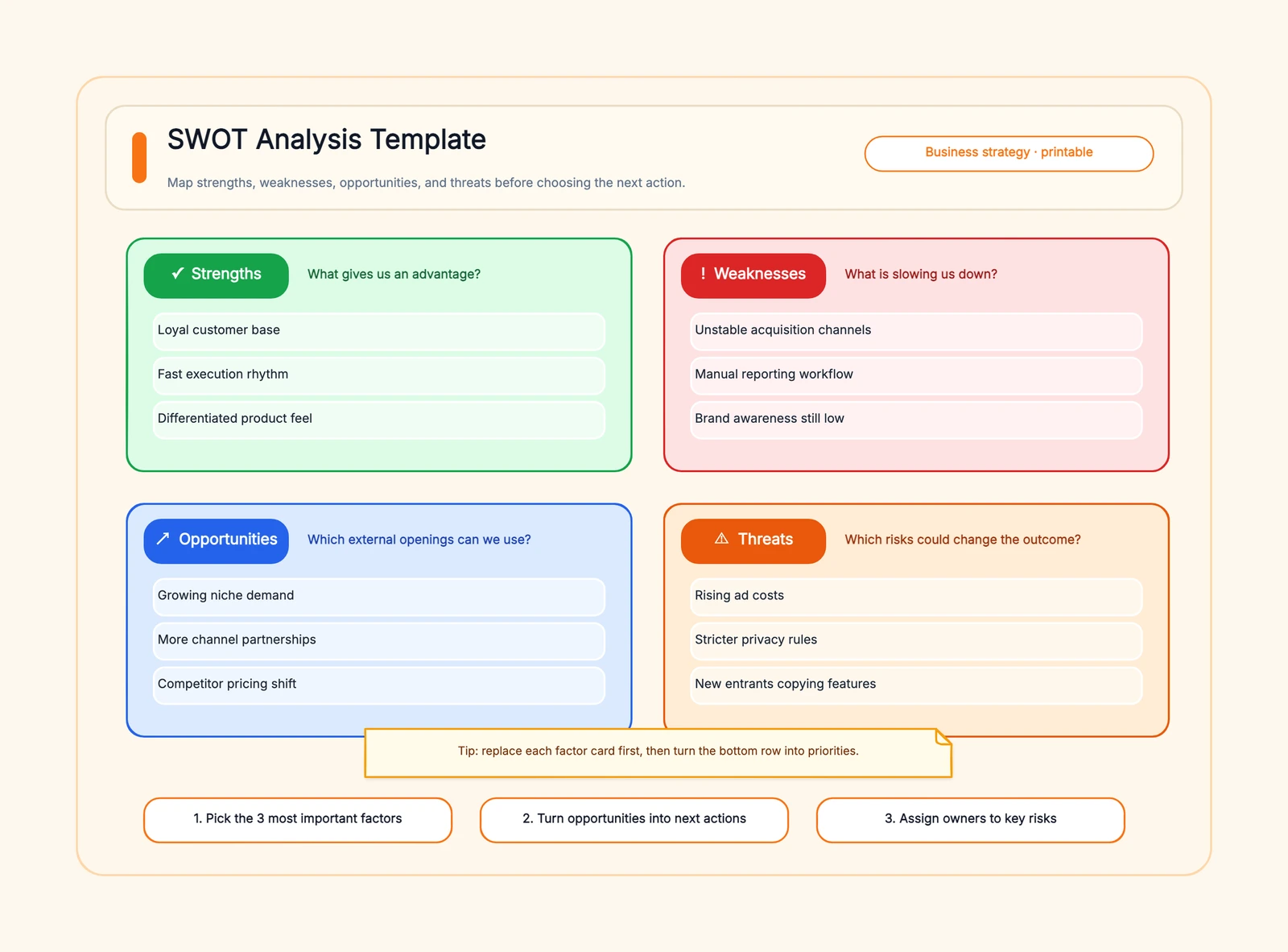
A free SWOT analysis template turns the four-quadrant framework — Strengths, Weaknesses, Opportunities, Threats — into a shareable visual in minutes. Whether you're evaluating a product launch, preparing for a board meeting, running a personal career review, or planning a marketing campaign, an editable SWOT template beats a bullet list in Google Docs because it forces you to fill every quadrant seriously and produces output that fits straight into a deck. If you're new to the framework, start with our guide on what SWOT analysis is and how to use it.
This page gives you three things: a ready-to-edit SWOT chart template you can open right now, a comparison of 8 free SWOT analysis tools — Canva, Miro, Lucidchart, Creately, Google Slides, FigJam, CodePic, and SmartDraw — plus dedicated guides to personal SWOT, marketing SWOT, TOWS vs SWOT, and SWOT vs PEST so you can pick the right template for your exact situation.
Open the template now. The free editable SWOT analysis template is pre-filled with the four-quadrant structure, opens in the browser with no sign-up. Fill in your quadrants, then click Export to download as PNG — no watermark.
How to Fill a SWOT Analysis Template
Before comparing tools, it helps to understand what goes in each quadrant. A SWOT analysis template is only as useful as the content you put into it — and the most common mistake is treating the four quadrants as four separate lists instead of four connected perspectives on the same situation.
Strengths (top-left, internal, positive)
What does your organization, team, or project do well? Strengths are internal advantages you control. Examples: a strong brand, proprietary technology, an experienced team, loyal customers, healthy cash reserves, or a unique distribution channel. Ask: "What do we do better than anyone else?" and "What do our customers say we do well?"
Weaknesses (top-right, internal, negative)
What holds you back? Weaknesses are internal gaps you need to address. Examples: high employee turnover, outdated technology, a thin marketing pipeline, dependency on one large customer, or a product with feature gaps compared to competitors. Be honest — a SWOT that lists only mild weaknesses is not useful. Ask: "What would our competitors say we are bad at?"
Opportunities (bottom-left, external, positive)
What external trends or changes could you use to your advantage? Opportunities are outside your control today, but you can choose to act on them. Examples: a new market segment opening up, a competitor stumbling, a regulatory change that favors your approach, or a technology shift that makes your product more relevant. Ask: "What trends could we ride if we moved now?"
Threats (bottom-right, external, negative)
What external factors could harm you? Threats are risks you should monitor or prepare for. Examples: new competitors entering your market, changing customer preferences, supply chain disruptions, rising costs, or regulatory changes that hurt your business model. Ask: "What keeps us up at night that is not under our control?"
A filled SWOT template should make the connections between quadrants visible: your strengths should help you capture opportunities, and addressing weaknesses should reduce your exposure to threats. If the quadrants feel disconnected, the analysis is not finished.
What to Look For in a SWOT Template Tool
Template quality and variety. A single blank 2×2 grid isn't a template — it's a rectangle. Good SWOT templates come with visual hierarchy, colour coding per quadrant, and sometimes pre-filled prompt text that guides your thinking. Some tools offer multiple SWOT layouts: matrix, list-based, circular, and variants like TOWS or action-plan-augmented grids.
Customization flexibility. Can you change colours, resize quadrants, add extra sections (like an action plan column), or break out of the 2×2 format when your analysis needs it? Rigidity is the enemy of useful strategic analysis.
Collaboration. SWOT is often a team exercise. Real-time co-editing where multiple people add items to different quadrants simultaneously beats passing a file back and forth.
Export formats. Your SWOT analysis needs to end up somewhere — a strategy deck, a business plan, a Notion doc. Can you export as PNG, PDF, or SVG? Can you embed it directly into a presentation?
Workflow integration. Does the tool connect to where your team already works? Embedding into Confluence, exporting to PowerPoint, or linking from project management tools matters for tools that need to be part of a larger process.
Canva
Free tier: Unlimited designs, hundreds of SWOT templates Collaboration: View-only link sharing (real-time editing on paid) Template variety: Extensive — dozens of SWOT-specific designs Export: PNG, PDF, JPG
Canva has the largest collection of ready-to-use SWOT templates among free tools. You're looking at dozens of options — minimalist grids, colourful quadrant layouts, infographic-style designs, even SWOT templates styled for specific industries. For someone who needs a polished SWOT visual quickly, Canva is the fastest path from blank page to finished output.
The templates are drag-and-drop editable: swap colours, change fonts, resize sections, add your brand logo. The design quality is high because Canva's entire business is making non-designers produce good-looking visuals.
The limitation is on the collaboration side. Free tier collaboration is limited to view-only link sharing — you can't have multiple people editing a SWOT diagram at the same time without a paid plan. For solo use or async review workflows, this isn't a problem. For live team workshops, it is.
Best for: Individuals or teams who need a visually polished SWOT analysis for presentations or reports, and prioritize design quality over real-time collaboration.
Miro
Free tier: 3 editable boards Collaboration: Full real-time, unlimited participants Template variety: Several SWOT templates + community templates Export: PNG, PDF, JPG (with limits on free)
Miro is where SWOT analysis meets collaborative whiteboarding. The built-in SWOT templates are solid, and the community template library adds more variations. But the real value is the experience of building a SWOT together in real time — everyone on the call can add sticky notes to different quadrants simultaneously, vote on items, and rearrange priorities on the fly.
The canvas is infinite, so you can extend your SWOT with related artifacts: a competitive landscape map next to the threats quadrant, an action plan below the opportunities section. This flexibility makes Miro particularly strong for workshop-style SWOT sessions.
The 3-board limit on free is the main constraint. If you use Miro for other things (retrospectives, brainstorming, user story mapping), those boards count against the same quota. Three boards fills up fast.
Best for: Teams who want to run collaborative SWOT workshops with real-time participation from multiple people.
Lucidchart
Free tier: 3 documents, 60 shapes per document Collaboration: Real-time co-editing Template variety: Professional SWOT templates available Export: PNG, PDF, Visio (limited on free)
Lucidchart brings professional diagramming precision to SWOT analysis. The templates are clean and structured, with proper alignment guides and snapping that keeps your quadrants evenly sized. If you care about the visual precision of your SWOT output — consistent spacing, aligned text, professional typography — Lucidchart does this better than whiteboard-style tools.
The free tier's 60-shape limit is where it gets tight. A detailed SWOT with multiple items per quadrant, plus headers and labels, can approach that limit. Simple analyses fit fine; thorough ones may not.
Lucidchart integrates well with Google Workspace and Microsoft Office, so embedding your SWOT into a Google Doc or PowerPoint deck is straightforward. The diagramming engine is mature and handles complex layouts well.
Best for: Users who need precise, professional-looking SWOT diagrams that integrate into Google Docs or Office documents.
Creately
Free tier: Limited documents, basic features Collaboration: Real-time co-editing Template variety: SWOT templates with visual data linking Export: PNG, PDF, SVG
Creately positions itself as a visual collaboration platform, and its SWOT templates reflect that — they're not just static grids but can link to other diagrams and data sources. You can create a SWOT where each item links to a more detailed analysis or action plan, which is useful for larger strategic planning exercises.
The free tier is restrictive: limited documents and features, which pushes toward the paid plans relatively quickly. But the SWOT templates are usable on free, and the visual quality is good.
The unique angle is the ability to add structured data to visual elements. Each SWOT item can carry metadata (owner, priority, timeline), turning your SWOT from a static picture into something closer to a lightweight project plan.
Best for: Teams doing detailed strategic planning who want their SWOT items to link to action plans and carry structured data beyond just text labels.
Google Slides / PowerPoint Online
Free tier: Unlimited — fully free Collaboration: Real-time co-editing Template variety: Basic — DIY or use community templates Export: PDF, PPTX, PNG
Sometimes the best tool is the one everyone already has. Google Slides and PowerPoint Online are fully free, support real-time collaboration, and everyone on your team already knows how to use them. Creating a SWOT is straightforward: set up a 2×2 grid using shapes or a table, colour each quadrant, and start typing.
The catch is that you're building from scratch or using a community template — there are no dedicated SWOT analysis features. No automatic quadrant resizing when content grows, no structured SWOT-specific layouts, no strategic analysis prompts. It's a presentation tool doing double duty as a diagramming tool.
For a quick SWOT in a team meeting where everyone can edit simultaneously, this approach works surprisingly well. For a polished deliverable, you'll spend more time on formatting than on analysis.
Best for: Anyone who needs a quick, no-setup SWOT analysis with real-time collaboration and zero learning curve. Particularly useful when the SWOT is going directly into a slide deck anyway.
FigJam
Free tier: 3 FigJam files in a team project + unlimited drafts Collaboration: Real-time, unlimited participants Template variety: SWOT templates + community templates Export: PNG, PDF, SVG
FigJam is Figma's whiteboard tool, and it inherits Figma's excellent collaboration DNA. The SWOT templates are clean and the real-time editing is smooth — multiple cursors, sticky notes, stamps, and emoji reactions make group SWOT sessions interactive and engaging.
For teams already in the Figma ecosystem, FigJam is the natural choice. The Starter plan allows three FigJam files in a team project plus unlimited drafts, and the familiar interface means little onboarding friction. The community template library adds variety beyond the built-in SWOT options.
The limitation is that FigJam is primarily a design team tool. If your strategy and planning team doesn't overlap with your design team, introducing FigJam for SWOT analysis means bringing in a tool that may feel unfamiliar to non-designers. The whiteboard format also means your SWOT is more freeform than structured — great for workshops, less ideal for formal documentation.
Best for: Design-oriented teams already using Figma who want a collaborative, visually engaging SWOT workshop experience.
CodePic
Free tier: Unlimited Collaboration: Read-only link sharing Template variety: SWOT template with hand-drawn style Export: PNG, JSON
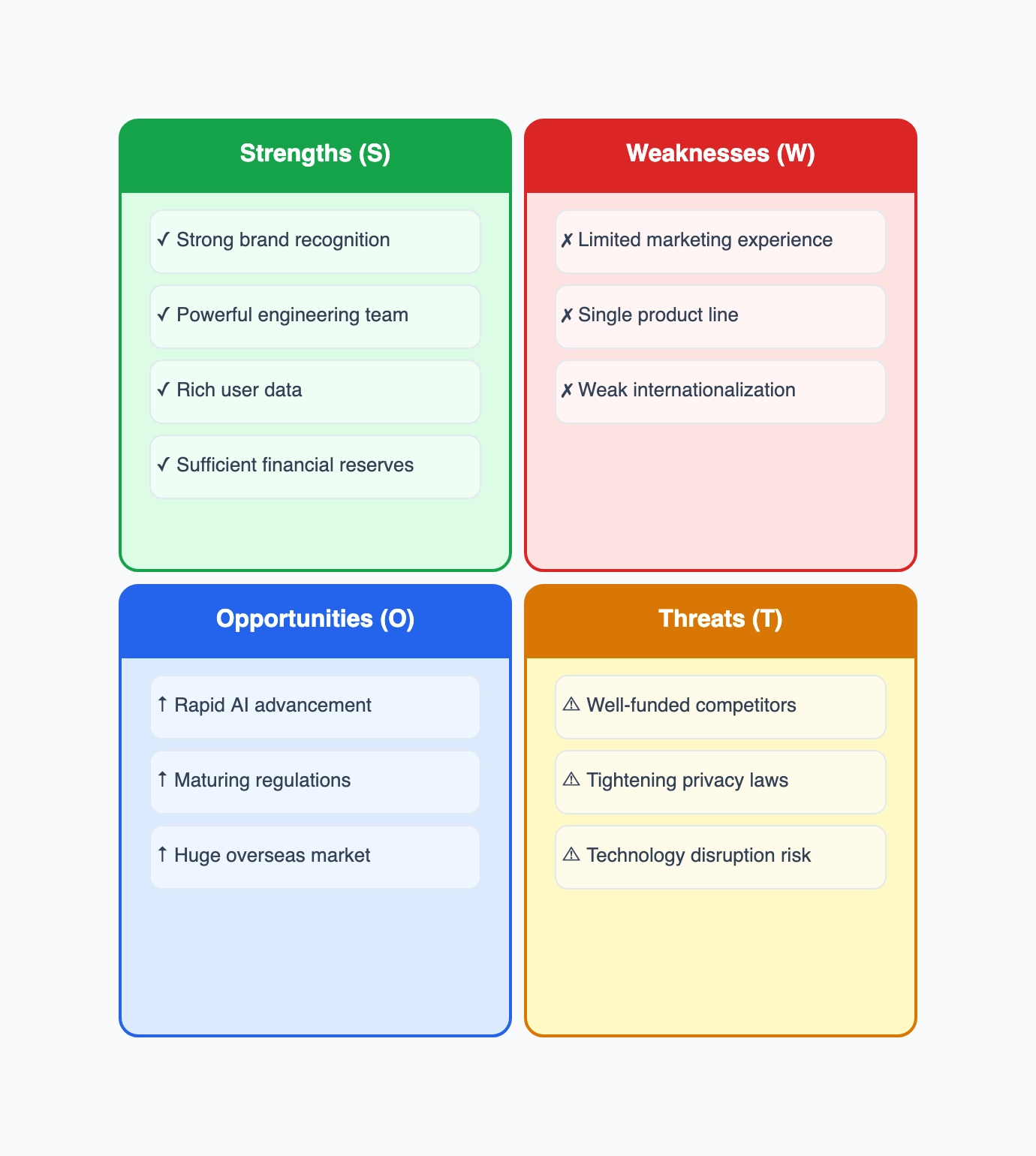
CodePic is a free diagramming tool with a hand-drawn aesthetic — think whiteboard sketch rather than corporate diagram. The SWOT template produces a visual that looks deliberately informal, which works well for brainstorming sessions, internal team discussions, and early-stage strategic thinking where you want to signal "this is a working document, not a final deliverable."
The AI integration is where CodePic adds something different. Through MCP protocol support, you can connect it to Claude or Cursor and generate a SWOT analysis structure from a text description — describe your business situation and get a populated SWOT grid as a starting point. It's not a replacement for strategic thinking, but it's a useful way to get a draft structure that you then refine.
Collaboration is currently limited to read-only link sharing. For live group SWOT sessions, you'd need to screen-share rather than co-edit.
Best for: Teams who want a quick, visually distinctive SWOT diagram with a hand-drawn style, or anyone using AI tools who wants to generate a starting SWOT structure from a description. Start from our SWOT analysis template — pre-filled with the four-quadrant structure so you can begin editing in seconds.
SmartDraw
Free tier: 7-day free trial, then paid Collaboration: Shared link viewing Template variety: Extensive SWOT and strategy templates Export: PNG, PDF, SVG, Visio
SmartDraw sits in a different tier from the other tools on this list — it's not free in the long run, but it's worth including because its SWOT templates are more comprehensive than anything else available. Where most tools give you a 2×2 grid and call it done, SmartDraw offers SWOT matrices with built-in strategy-generation logic, automatic formatting, and integration with project planning templates (Gantt charts, timelines, action plans).
The 7-day trial gives you full access to try it, but after that you're looking at a paid subscription. For one-off SWOT analyses this makes no sense — pick any of the free tools above. For a consulting firm or strategy team that produces SWOT analyses regularly and wants them to flow directly into project plans and presentations, SmartDraw earns its price.
Best for: Professional strategists and consultants who produce SWOT analyses as part of larger planning engagements and want template automation and project-plan integration.
Quick Comparison
| Tool | Free Plan | Collaboration | Templates | Export | Customization |
|---|---|---|---|---|---|
| Canva | Unlimited designs | View-only sharing | Extensive | PNG, PDF | High |
| Miro | 3 boards | Real-time | Good + community | PNG, PDF | Medium |
| Lucidchart | 3 docs / 60 shapes | Real-time | Professional | PNG, PDF, Visio | High |
| Creately | Limited docs | Real-time | Good + data linking | PNG, PDF, SVG | High |
| Google Slides / PPT | Unlimited | Real-time | DIY | PDF, PPTX, PNG | Low |
| FigJam | 3 team files + unlimited drafts | Real-time | Good + community | PNG, PDF, SVG | Medium |
| CodePic | Unlimited | Read-only link | Hand-drawn style | PNG, JSON | Medium |
| SmartDraw | 7-day trial | View-only | Extensive | PNG, PDF, SVG, Visio | High |
Personal SWOT Analysis Template
A personal SWOT analysis applies the same four quadrants to you instead of a business. Strengths become your skills, experience, and network. Weaknesses are gaps you want to close — a missing certification, a skill you've been putting off. Opportunities are external: a growing industry, a retiring competitor, a new role opening up. Threats are risks to your career path: automation, market contraction, an oversaturated job market.
Personal SWOTs are most useful at three moments: preparing for a job interview, deciding between career paths, and doing an annual self-review. The framework forces you to be honest about weaknesses in a way that casual self-reflection rarely does, and the opportunities quadrant pushes you to look outward instead of just inward.
We've written a complete guide to personal SWOT analysis templates with a fillable template, real examples for students and mid-career professionals, and step-by-step instructions for turning your SWOT into an action plan. If you're here for career planning, start there.
Marketing SWOT Analysis Template
A marketing SWOT analysis narrows the framework to marketing-specific factors. Strengths might be brand recognition, a high-converting channel, or a strong content engine. Weaknesses could be a thin email list, underperforming paid ads, or inconsistent messaging across channels. Opportunities include underserved audience segments, new platform features (think TikTok Shop or LinkedIn newsletters), and seasonal demand spikes. Threats range from competitor campaigns to privacy regulation changes that break your attribution.
The difference between a general SWOT and a marketing SWOT is specificity. A general SWOT says "strong brand"; a marketing SWOT says "Instagram engagement rate 3× industry average, driven by UGC reels." That specificity is what makes the analysis actionable — you can build a campaign calendar off a marketing SWOT in a way you can't off a generic one.
Read our full marketing SWOT analysis guide for a fillable marketing SWOT template, examples from product launches and brand campaigns, and a framework for prioritizing which SWOT items to act on first.
TOWS vs SWOT: Strategy Generation
People often treat TOWS and SWOT as interchangeable — same letters, different order. They're not. The distinction matters once your analysis needs to turn into action.
SWOT is the analysis. You list items in four quadrants and understand your position. TOWS is strategy generation. You cross-match the quadrants to produce four types of strategies:
- SO strategies (Strengths × Opportunities): How do you use your strengths to capture opportunities? This is the "attack" quadrant.
- WO strategies (Weaknesses × Opportunities): How do you overcome weaknesses by seizing opportunities? Hiring, training, partnering.
- ST strategies (Strengths × Threats): How do you use strengths to neutralize threats? Defensive positioning.
- WT strategies (Weaknesses × Threats): How do you minimize weaknesses to avoid threats? Risk mitigation, exit planning.
In practice, a team runs a SWOT first — 45 minutes filling the quadrants — then spends the next hour running the TOWS cross-match. The SWOT is the diagnosis; the TOWS is the prescription. Skipping the TOWS step is the most common reason SWOT analyses end up as wall art instead of action.
For a deeper comparison with worked examples of each strategy type, read our TOWS vs SWOT guide.
SWOT vs PEST Analysis: Which Framework When?
SWOT and PEST are both strategy frameworks, but they look in different directions. SWOT splits its attention: the top row (Strengths and Weaknesses) is internal, the bottom row (Opportunities and Threats) is external. PEST (Political, Economic, Social, Technological) is purely external — it scans the macro-environment for forces you can't control.
The two frameworks aren't competitors; they're complementary. A common pattern: run a PEST first to map the landscape, then feed the most relevant PEST findings into a SWOT's Opportunities and Threats quadrants. The PEST gives you the raw external data; the SWOT contextualizes it against your internal reality.
Here's a concrete example. A PEST for a fintech startup might surface "open banking regulation taking effect in Q3" (Political) and "Gen Z prefers debit over credit" (Social). Those go into the SWOT: the regulation is a Threat if you're not ready, an Opportunity if you are; the consumer trend is an Opportunity if your product aligns, a Threat if it doesn't. The SWOT forces the "so what?" that PEST alone leaves hanging.
See our SWOT vs PEST analysis comparison for a full breakdown, including a decision tree for choosing which framework to run first.
Editable SWOT Analysis Template (PPT, Google Slides, PDF)
The most-requested format for a SWOT analysis template is something you can edit in PowerPoint, Google Slides, or download as a PDF. Here's where each tool lands on format support:
- CodePic — edit in browser, export to PNG or JSON, copy the PNG into any deck. Free, no watermark.
- Google Slides — natively editable in Slides, downloads as PPTX or PDF. Free with a Google account.
- Lucidchart — embeds into Google Slides and PowerPoint, downloads as PDF/PNG. Free tier limited to 3 documents.
- Canva — downloads as PNG/PDF/PPTX. Free with optional watermark on some premium templates.
If you specifically need a SWOT downloadable template with no learning curve, Google Slides and CodePic are the fastest. If you need it to look like a designed asset, Canva and Lucidchart win on visual polish.
How to Download a SWOT Analysis Template (Free)
Three-step version — works for any of the tools above, and takes about a minute:
- Open a template. For the fastest free path, open the SWOT analysis template — no signup, opens directly in your browser.
- Fill in the four quadrants. Strengths, Weaknesses, Opportunities, Threats — a few bullet points each. Use the built-in prompt text as a starting cue.
- Export to PNG or PDF. Use the tool's Export or Download menu. In CodePic that's PNG (no watermark); in Canva/Lucidchart you can also pick PDF; in Google Slides use File → Download → PDF.
How to Choose
If real-time team collaboration is non-negotiable: Miro or FigJam. Both handle multi-person SWOT sessions well, with Miro leaning toward general business teams and FigJam leaning toward design-adjacent teams.
If you need the most polished visual output: Canva. The template variety and design quality are unmatched for producing SWOT analyses that look good in reports and presentations.
If precision and integration matter: Lucidchart. Clean diagrams that embed neatly into Google Docs and Office documents.
If everyone already has the tool: Google Slides or PowerPoint Online. No setup, universal access, and real-time co-editing. Functional rather than beautiful.
If you want structured data behind the visual: Creately, for linking SWOT items to action plans and metadata.
If you use AI tools or want the whiteboard sketch look: CodePic, for generating SWOT structures from text and getting a hand-drawn visual style.
If your team lives in Figma: FigJam. Don't introduce another tool when you already have a good one.
If SWOT is part of a larger planning practice: SmartDraw, for the project-plan integration and strategy-generation templates.
The most productive approach: pick the tool your team already uses for adjacent work. Adding another app to the stack for one framework rarely pays off. If nobody on your team uses any of these, start with Google Slides — it's free, collaborative, and good enough to find out whether a dedicated SWOT tool would actually add value.
If you'd rather skip the setup entirely, our SWOT analysis template opens straight into an editable four-quadrant grid — no account, free to export, and styled to look like a working draft rather than a finished corporate chart.
Related Reading
- Free SWOT Analysis Maker Template — Enter the editor, fill the four quadrants, and export it free
- How to Make a SWOT Analysis — Turn the four lists into concrete actions
- Personal SWOT Analysis Template: Free Fillable Template + Career Examples — Apply the SWOT framework to your own career with a step-by-step guide
- Marketing SWOT Analysis: Free Template + Real Campaign Examples — Narrow the four quadrants to marketing-specific factors with actionable templates
- TOWS vs SWOT: What's the Difference? Strategy Generation Explained — Turn your SWOT diagnosis into a TOWS prescription with worked examples
- SWOT vs PEST Analysis: Which Framework to Use When — Internal-external balance vs pure macro-environment scan, with a decision guide
- What Is a SWOT Analysis? — A complete guide to the framework, with real examples and common mistakes
- What Is a Business Model Canvas? — Another essential strategy tool that complements SWOT analysis