The practical Figma vs Sketch choice is now clear: choose Figma when a cross-platform team needs browser-based multiplayer, built-in handoff, and one shared source of truth. Choose Sketch when designers work on Macs, need reliable offline performance, and prefer local files in a native application.
Pricing and feature lists matter, but platform access and file ownership usually decide the migration. The comparison below tests those workflow differences, including components, plugins, collaboration, handoff, and switching cost.
At a Glance
| Figma | Sketch | |
|---|---|---|
| Platform | Browser (any OS) | macOS only |
| Real-time collaboration | Built-in, multiplayer since day one | Added later, workspaces required |
| Prototyping | Built-in | Third-party (Principle, InVision) |
| Developer handoff | Built-in (Inspect mode) | Third-party (Zeplin, Abstract) |
| Free plan | Unlimited files, 3 editors per file | No free plan (Mac-only trial) |
| Paid from | $12/editor/month (Professional) | $10/editor/month (Standard) |
| Offline | Limited (requires initial load) | Full native app |
| Plugins | Large community marketplace | Large community marketplace |
| Component system | Variants, component properties, auto-layout | Symbols, resizing, Smart Layout |
Where Figma Wins
Cross-platform is a bigger deal than it sounds. Figma works on Mac, Windows, and Linux through any modern browser. If your team includes developers on Windows, product managers on Linux, or stakeholders who need to leave comments without installing anything — Figma handles all of that. Sketch requires every editor to own a Mac. In a mixed-OS organization, that alone decides the conversation.
Real-time multiplayer is the default, not an add-on. Open a Figma file and you see other people's cursors moving. No check-in, no sync, no "who has the latest version." Sketch's collaboration works, but it feels like a layer added to a single-player app; Figma's feels like the app was built around it from the start.
Developer handoff doesn't need extra tools. Figma's Inspect mode gives developers measurements, colors, typography, and exportable assets directly from the design file — no Zeplin, no Abstract, no third-party subscription. For teams that were paying for separate handoff tools, switching to Figma consolidates two bills into one.
The community momentum is real. Most new plugins, templates, and design systems ship for Figma first, Sketch second (if at all). When you Google "how to do X in [design tool]," the Figma result is usually more recent and more detailed. This matters when you're trying to solve a problem at 10 PM.
Where Sketch Still Holds
Native app performance. Sketch is a macOS app that launches instantly, works offline fully, and doesn't depend on a browser tab sharing RAM with 40 other tabs. If you work on complex files with hundreds of artboards, the performance difference is noticeable. Figma handles large files better than it used to, but a native app still wins on raw speed.
You own your files. Sketch files live on your machine — not in a cloud workspace that you access through a subscription. For teams with strict data residency requirements, or designers who just prefer the tangibility of local files, this still matters.
The plugin ecosystem is mature. Sketch's plugin community has been building for over a decade. Craft by InVision, Runner, Anima — tools that some teams have built their entire workflow around — are Sketch-first. If your team's process depends on a plugin that doesn't have a Figma equivalent, you're not switching.
Predictable pricing for large teams. Figma's per-editor pricing scales linearly — a 50-person design team pays 50 × $12 = $600/month. Sketch's Mac-only requirement means large organizations negotiate volume licenses, and the per-seat cost drops at scale. For enterprise, this math sometimes favors Sketch.
The Workflow Differences That Actually Matter
Components vs Symbols. Figma's component system (with variants and component properties) is more flexible than Sketch's symbols. In Figma, a single button component can have variants for size, state, and icon placement — all configured through a properties panel. In Sketch, you'd typically create separate symbols for each variant and manage them manually.
Auto-layout vs Smart Layout. Figma's auto-layout is closer to CSS Flexbox — it handles padding, spacing, and resizing direction with a single property set. Sketch's Smart Layout works well for simple cases but requires more manual setup for nested layouts. If your designs are component-heavy with dynamic content, Figma saves hours per week on layout adjustments.
Design systems at scale. Both tools can power a design system, but Figma's shared component libraries update in real time across all files. When you publish a change to a component in the library, every file using it gets the update. Sketch's library system works through a similar publish-subscribe model but requires manual syncing.
Test the Workflow with One Wireframe
Open the wireframe below, turn one screen into a reusable component, request a review, and prepare it for developer handoff in both tools.
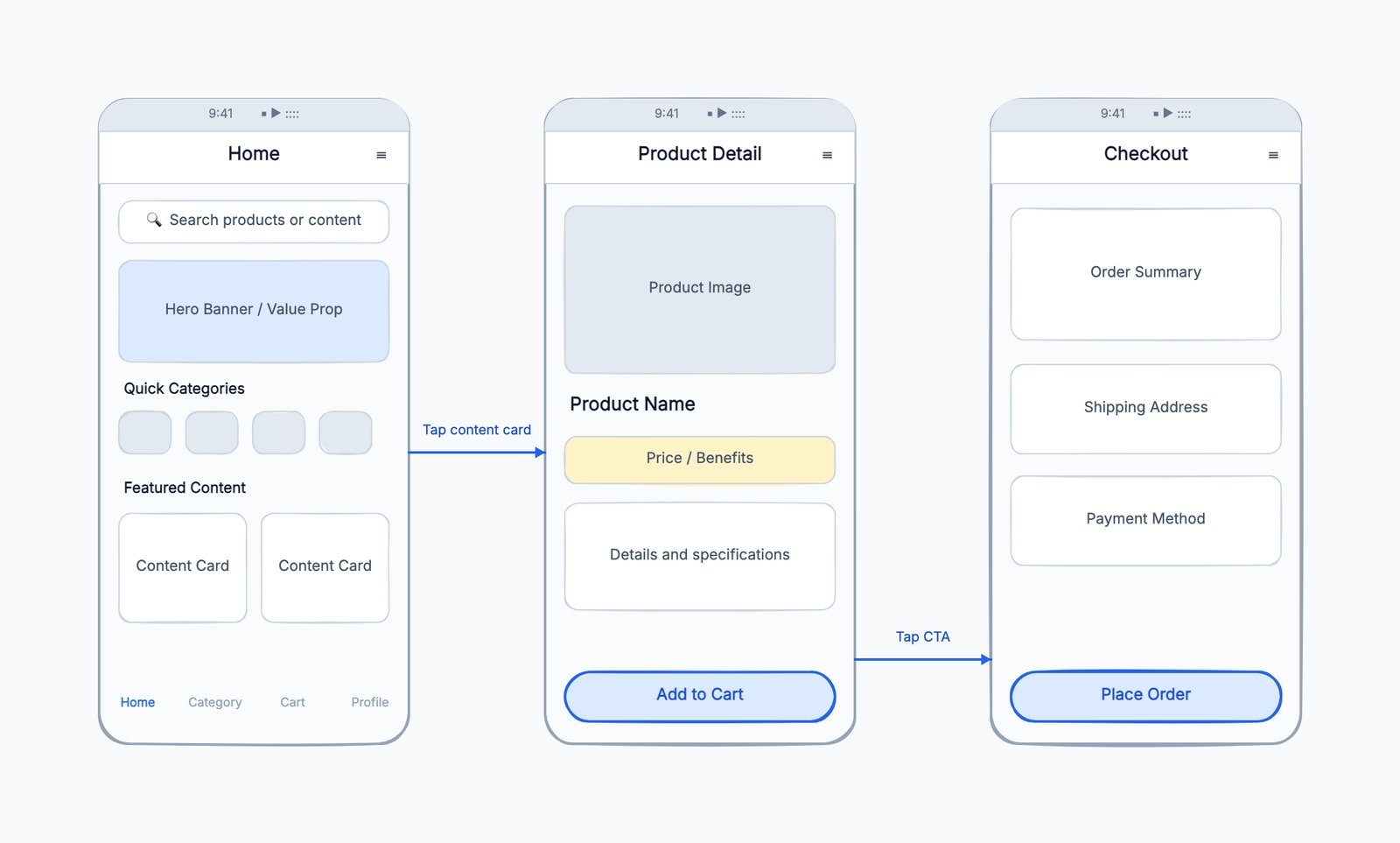
Wireframe
Try this templateThat test exposes the real difference between a browser-first shared workspace and a native Mac workflow with local files.
The Cost of Switching
If your team is on Sketch and considering a move to Figma, here's what the migration actually costs — beyond the subscription price.
Time: Most teams take 1-2 weeks to fully adapt. The tools feel similar enough that you'll be productive on day one, but different enough that you'll keep reaching for Sketch muscle memory for the first few days. Auto-layout takes longer to learn than Smart Layout; variants take longer to set up than symbols.
File migration: Figma's Sketch importer handles artboards, basic shapes, text layers, and symbols (converted to components). What it doesn't handle well: complex masking, deeply nested symbol overrides, and plugins that baked custom data into Sketch files. Budget a day to clean up imported files, especially if your Sketch files are old and have accumulated cruft.
Plugin rebuild: For every Sketch plugin your team relies on, check whether a Figma equivalent exists. Most popular plugins have been ported, but niche ones may not have. If a critical plugin has no Figma version, test the alternative before committing to the migration.
The bigger cost: Learning a new design tool is not the expensive part of switching. The expensive part is the design system migration — porting your component library, rebuilding your shared styles, and retraining the team on new workflows. Budget at least a week for a design system of any real size.
Choose by What Happens After the Design
The best choice becomes clearer when you follow a design beyond the canvas. A mockup is rarely finished when the designer stops moving layers; it still needs review, iteration, developer handoff, and long-term maintenance.
For a distributed product team, start with Figma. A product manager can open the same link, a developer can inspect measurements, and a designer can respond to comments without exporting a new file. The browser model removes installation and operating-system decisions from routine review. This is also why teams moving from whiteboard exploration into interface design often keep their early work near a shared wireframe workflow.
For an independent Mac designer, Sketch remains practical. Local documents, full offline use, and native performance reduce dependence on a hosted workspace. That matters when files are large, internet access is inconsistent, or the designer wants an ordinary folder and backup system to remain the source of truth. Collaboration is possible, but it is not the assumption behind every editing action.
For a mature design system, audit dependencies before choosing. List shared components, libraries, plugins, handoff tools, prototypes, and automation. A feature comparison may favor Figma while one business-critical Sketch plugin still makes immediate migration risky. Conversely, a team paying for separate review and handoff services may simplify its stack by moving those jobs into Figma. Test a representative component family rather than importing an easy landing page.
For early concepts, neither product may be necessary yet. A quick user flow, information hierarchy, or low-fidelity screen can start in a lighter visual tool. Compare the broader diagramming tool options when the work mixes flows, architecture, and UI sketches. Move into Figma or Sketch only when reusable interface components and production handoff become the main job.
Making the Choice
Go with Figma if your team is cross-platform, distributed, or includes non-designers who need to view and comment on files. The zero-install, browser-based model removes the biggest friction in design collaboration — getting everyone access to the file.
Stick with Sketch if your entire team is on Mac, you're deep into a Sketch plugin ecosystem that would be painful to rebuild, or your organization has data residency policies that make cloud-only tools difficult.
A third option for teams that don't need either tool's full feature set: if you're doing lightweight wireframing, brainstorming layouts, or quick UI sketches, a free online whiteboard like CodePic gives you an infinite canvas without a subscription, account setup, or platform restriction. Open a tab, draw, share the link.
Bottom Line
Figma has the stronger cross-platform collaboration model. Sketch remains a mature, performant option for Mac-based design teams. The right choice depends on operating systems, file ownership, collaboration, and existing dependencies. Test both with real components and reviewers instead of an isolated demo file.
Related Reading
- What is a wireframe? — decide what should be resolved before high-fidelity design begins.
- Best diagramming tools — compare visual tools when the work extends beyond interface design.
- FigJam alternatives — choose a collaborative canvas for the exploration stage before Figma or Sketch.